

Builtin Provider 
Section titled “Builtin Provider ”The Builtin provider supports manually adding track and radio station URLs to the database and it also generates various Playlists.
Features
Section titled “Features”- You can add tracks accessible via URL or any online station. You can also add your locally created stations using, for example, Icecast.
Settings
Section titled “Settings”For each of the builtin playlists there is a toggle to enable or disable them.
This provider is added automatically and cannot be disabled or deleted.
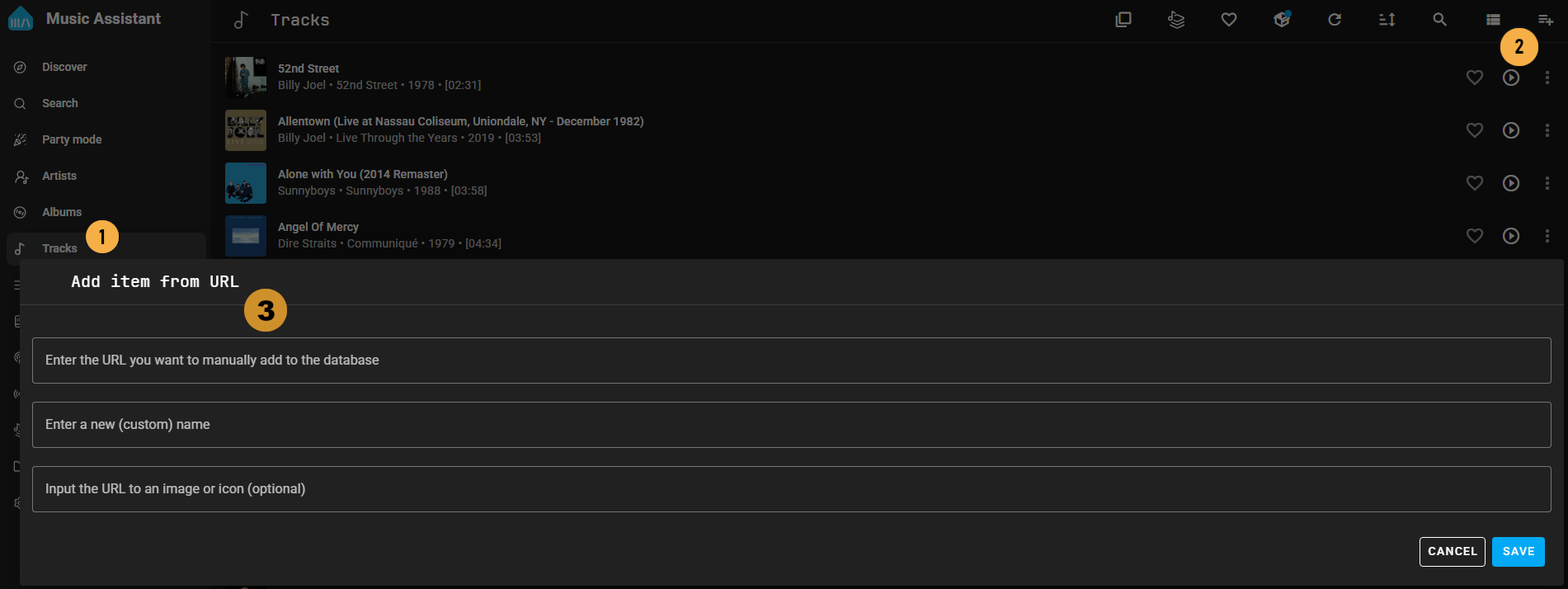
To manually add items follow these steps:
-
In the main menu select ‘Tracks’ or ‘Radio’
-
Then click on the icon in the top right corner
-
Add the full URL including http:// or https:// and optionally a custom name and image URL.
After completing step 3 the track or station will become available in the respective view (A press of the refresh icon  may be required).